



A cheap 16 core VPS is perfect for you if you want your server to run multiple programs simultaneously and don’t want to spend high monthly costs.
You need to make sure that the server is reliable. We have assembled a complete list of the best yet affordable VPS with great performance.
To make your selection process easier, we have also listed the specs and the starting price of each hosting server.



7 Cheap 16 core VPS providers
Here are the VPS providers that give you 16 cores (or 16 vCPU) at a reasonable price. Keep in mind that most of them use shared vCPUs, while VPSDime Premium VPS and Cherry Servers VDS give you dedicated CPU resources.
1. Kamatera (Best Overall)
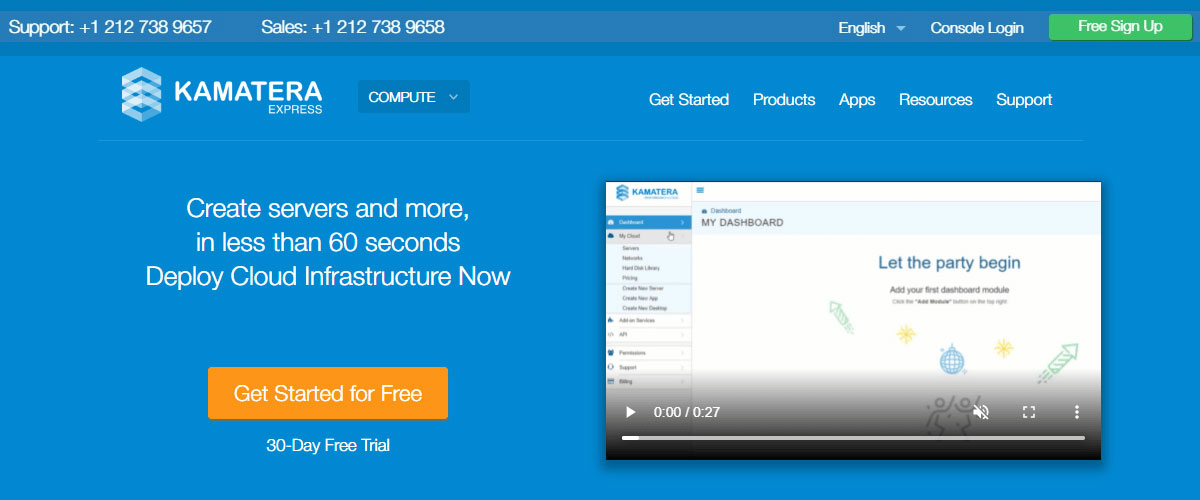
Kamatera is a fantastic cheap 16-core VPS. They offer 4 different types of servers. The A type (availability) is the preferred one by most users. The general-purpose CPU has huge scalability in terms of CPU core. You can get up to 104 vCores.
Not to mention, a general-purpose CPU will cost you a bit more. For this reason, we will focus more on the Availability type of server.
You can configure your VPS as per your need. It allows you to customize RAM, storage, OS, and many more. Talking about OS, they have more than 100 templates for it. There is no single point of failure.
It comes with Intel Xeon Platinum/Cascade Lake processors. They also have an hourly payment option if you don’t want to rent it for a month. The deployment is instant. It’s a fully reliable service as you will get a 99.95% uptime guarantee.
You can deploy your cheap 16-core VPS in less than 60 seconds.
Starting price: $100 per month
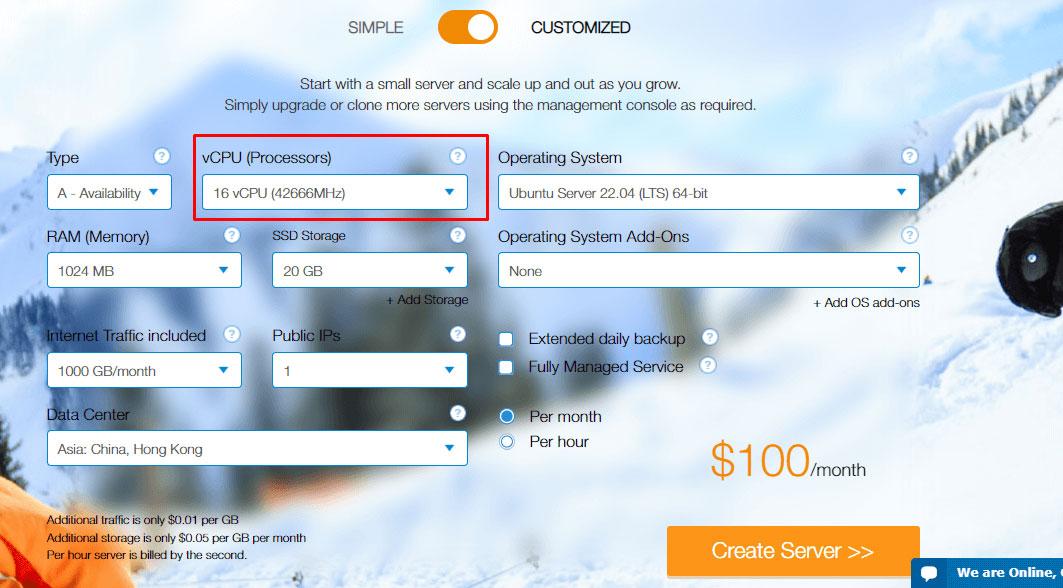
Specs of Kamatera
- CPU: 16 to 32 vCores (for Availability type server)
- RAM: 1 to 132 GB
- Storage: 20 to 4000 GB SSD
- Server location: US (5 locations), Canada, Netherlands, Germany, Sweden (2 locations), UK, Italy, Spain, Hong Kong, and Israel (5 locations).
2. InterServer (Runner-Up)

For the runner-up VPS, we have got Interserver. It’s for people who have a little bit of technical knowledge. Unlike Kamatera, there is limited scalability here. You can only go up to 16 cores.
On the positive side, you will get self-healing hardware. In case of any technical glitch, the server heals itself (it transfers the node to another server with no downtime). They provide lightning-fast server speed. Even the uptime is awesome at 99.9%.
If you are a developer trying out different things or have a team of developers, this is perfect for you. Everything is stored in one place, so anyone with permission can access the server. The support team is always there to help.
The service is vanilla, you can surely add any panel you want for an extra cost. For other scripts, you will have to install them manually. The resources are dedicated. So, you can use all the resources allocated to your account.
You can use any virtualization from KVM, Hyper-v, OpenVZ, and Virtuozzo.
Starting price: $96 per month
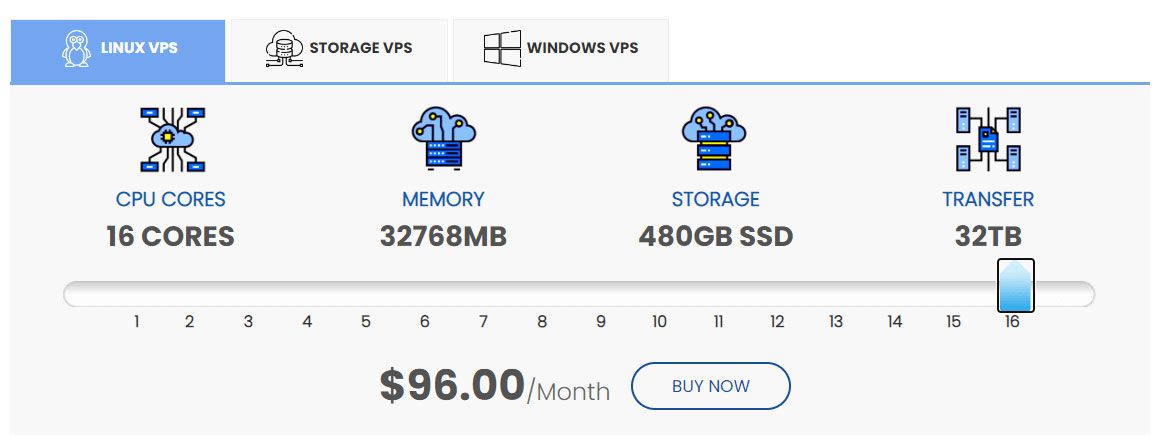
Specs of Interserver
- CPU: 16 cores
- RAM: 32 GB
- Storage: 480 GB SSD
- Server location: Los Angeles, California, and Secaucus, New Jersey
3. Impreza Host
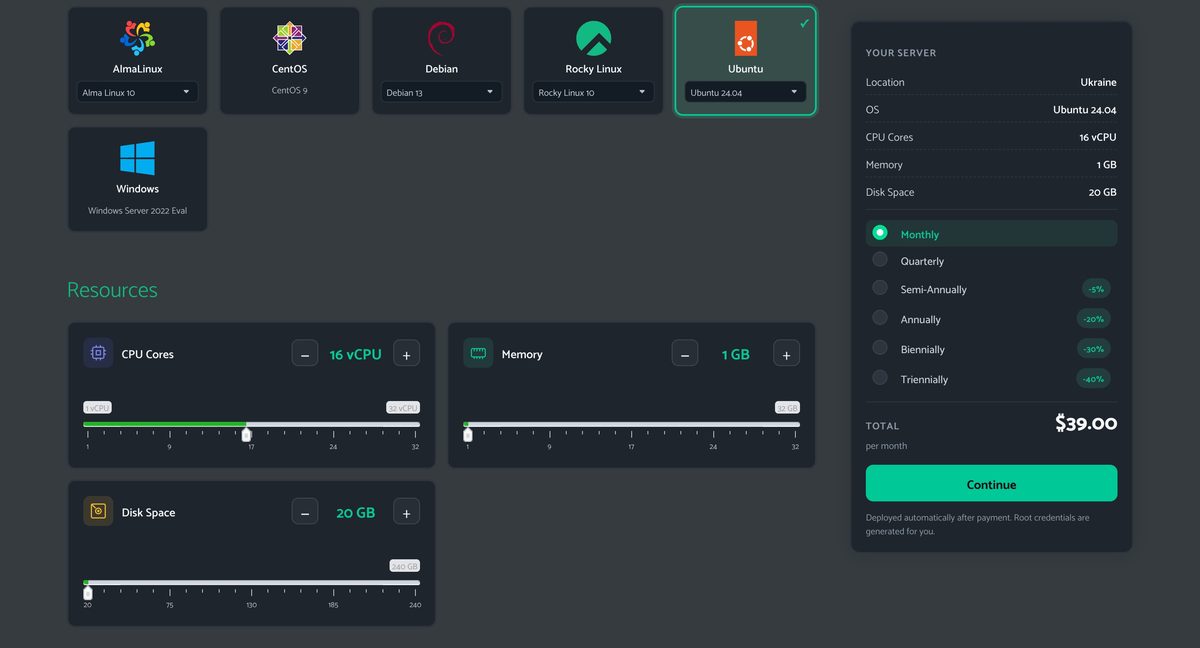
Impreza Host is another option if you need a VPS with a high CPU allocation. Instead of forcing you into a fixed package, Impreza lets you choose the number of vCPU directly in the shopping cart, along with the amount of RAM and storage.
The configurator currently allows you to select between 1 and 32 vCPU. For example, you can configure a server with 16 vCPU, 1 GB RAM, and 20 GB storage for $39 per month, as shown in the checkout configuration.
It is important to distinguish vCPU from physical CPU cores. A vCPU represents a virtual processor allocated to your VPS, rather than a dedicated physical CPU core. So, while this configuration gives you 16 vCPU, it should not be described as a 16-core physical dedicated server.
You can also adjust the resources independently. If 1 GB of RAM is too low for your workload, you can increase the memory without changing the CPU allocation. The same applies to storage, which can also be increased from the default 20 GB. Resources can also be upgraded or downgraded later from the Impreza dashboard.
The VPS is KVM-based, and Impreza supports several operating systems, including Ubuntu, Debian, AlmaLinux, Rocky Linux, CentOS, and Windows Server. The configuration shown here uses Ubuntu 24.04 and the Ukraine server location.
Starting price: $39 per month for the shown 16-vCPU configuration
Specs of Impreza Host
- CPU: 16 vCPU (1 to 32 vCPU configurable during checkout)
- RAM: From 1 GB, configurable
- Storage: From 20 GB, configurable
- Virtualization: KVM
- Operating system: Ubuntu 24.04 in the shown configuration
- Server location: Ukraine in the shown configuration
4. AlexHost

AlexHost is one of the more affordable options if you need a 16-vCPU VPS. Its Platinum VPS range uses Intel Xeon Platinum 8268 processors and KVM virtualization, with plans ranging from smaller VPS configurations up to the P16 plan.
The P16 gives you 16 vCPU, 32 GB RAM, and 320 GB NVMe storage for €70 per month. You also get a 1 Gbps connection with unlimited bandwidth, which makes this plan particularly attractive for applications that use a lot of monthly traffic.
This is an unmanaged VPS, so you are responsible for managing the operating system and server software yourself. AlexHost uses KVM virtualization, and its Platinum VPS servers are currently hosted in Moldova. The provider also states that resources on this VPS line are allocated without overselling.
The use of NVMe storage is another advantage over older dedicated-server configurations using HDDs or SATA SSDs. For a website, database, application server, or other workload that benefits from both multiple CPU threads and fast storage, the P16 gives you a fairly balanced configuration without the price of a physical 16-core dedicated server.
Starting price: €70 per month for 16 vCPU
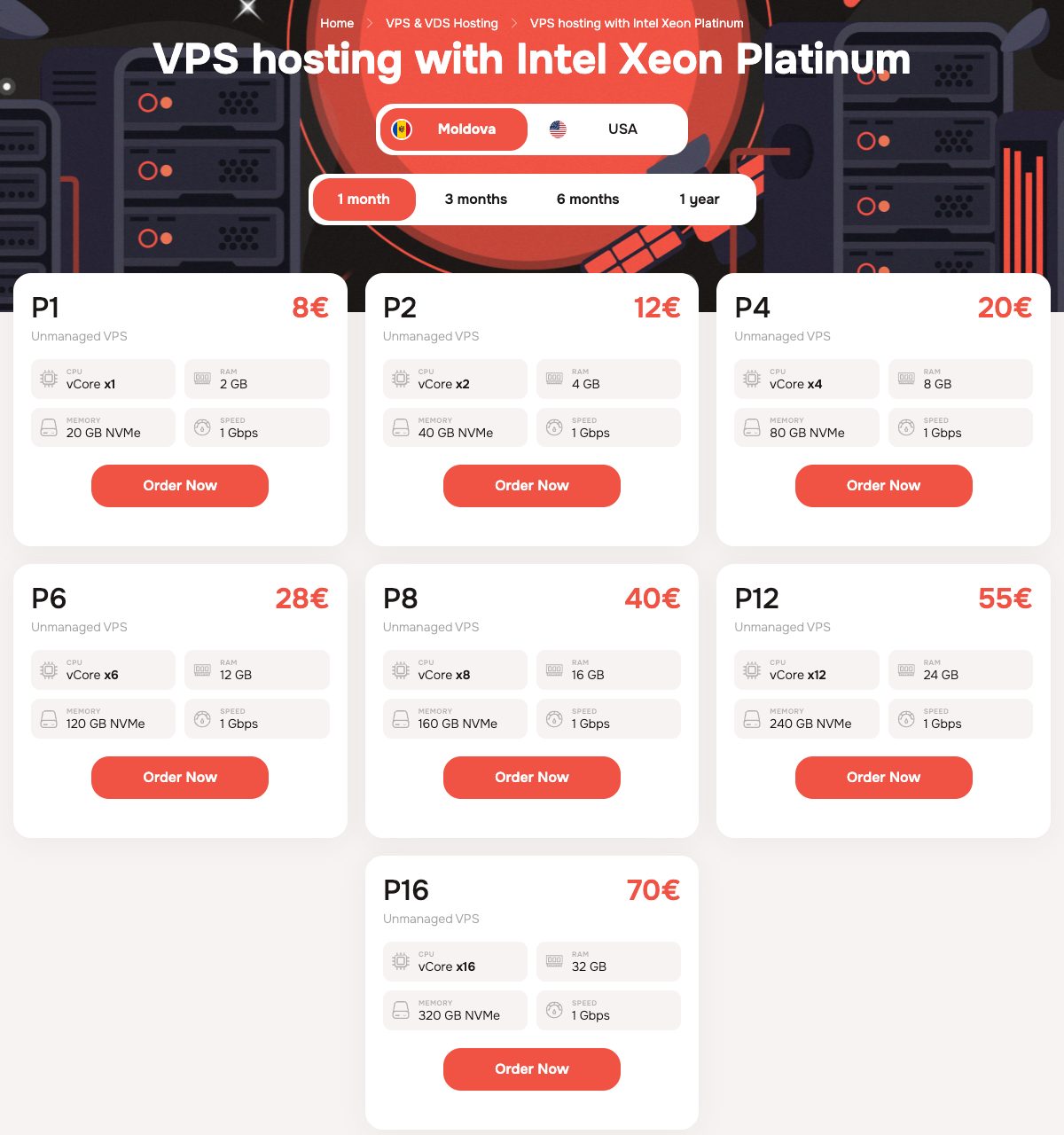
Specs of AlexHost P16
- CPU: 16 vCPU
- RAM: 32 GB
- Storage: 320 GB NVMe
- Bandwidth: Unlimited
- Network: 1 Gbps
- Virtualization: KVM
- Server location: Moldova
5. Cherry Servers
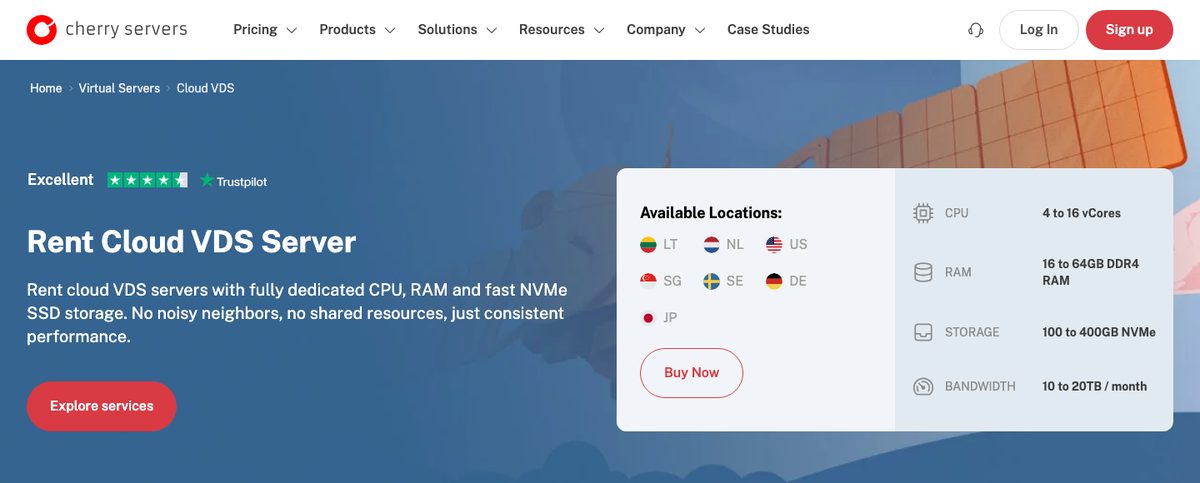
Cherry Servers is another strong option if you need 16 vCPU with dedicated compute resources. Instead of limiting you to basic shared-resource VPS hosting, Cherry Servers offers VDS configurations where the allocated virtual cores are tied to dedicated physical CPU resources.
The Cloud VDS 8 comes with 16 vCores on 8 physical CPU cores, 64 GB RAM, 400 GB NVMe storage, and a 1 Gbps connection. It also includes 20 TB of monthly outbound traffic, while inbound traffic is unmetered. The servers use Intel Xeon Gold 6330 or 6230R hardware.
Cherry Servers also gives you considerably more location choice than some of the cheaper alternatives. Cloud VDS 8 is offered in Lithuania, Amsterdam, Chicago, Singapore, Stockholm, and Frankfurt, although availability varies by location.
Another useful feature is the billing flexibility. You can pay hourly instead of committing to an entire month. Cloud VDS 8 is currently $0.259 per hour. Its normal monthly price is listed at $150.93, while the site currently shows a discounted monthly price of $127.53.
If you need even more performance, Cherry Servers also has a Performance VDS 8 with 16 vCPU, 64 GB RAM, 800 GB NVMe, and a 3 Gbps uplink, although it costs significantly more.
Starting price: $150.93 per month regular price (currently $127.53/month on promotion)
Specs of Cherry Servers Cloud VDS 8
- CPU: 16 vCores on 8 physical cores
- RAM: 64 GB
- Storage: 400 GB NVMe
- Bandwidth: 20 TB outbound traffic; unmetered inbound traffic
- Network: 1 Gbps
- CPU hardware: Intel Xeon Gold 6330 or 6230R
- Billing: Hourly or monthly
- Server locations: Lithuania, Netherlands, USA, Singapore, Sweden, and Germany
6. Time4VPS

Time4VPS is the go-to server if you want your server located in Europe. The server you will get is Intel® Xeon® Gold 6132. The multi-core processor runs at 2.6 GHz clock speed. They use gen-10 processors for better speed.
It’s a decent service if you are planning to host your web app for a short time. The renewal price is doubled at the end of 1-year. Along with this, the scalability is very limited. You can only go up to 16 cores.
It comes with DDR4-2666 ECC REG RAM. For SSDs, you will have RAID-protected SDD.
You can deploy any scripts with the auto-installer they have. With that, you don’t need to install the scripts manually. The server is reliable as they provide 99.95% uptime. You can add a 1 Gbps port as well.
If you want a server located outside of Europe, then you should pick another host.
Starting price: €171.49 ($176.99), renews at €342.99 ($353.98)
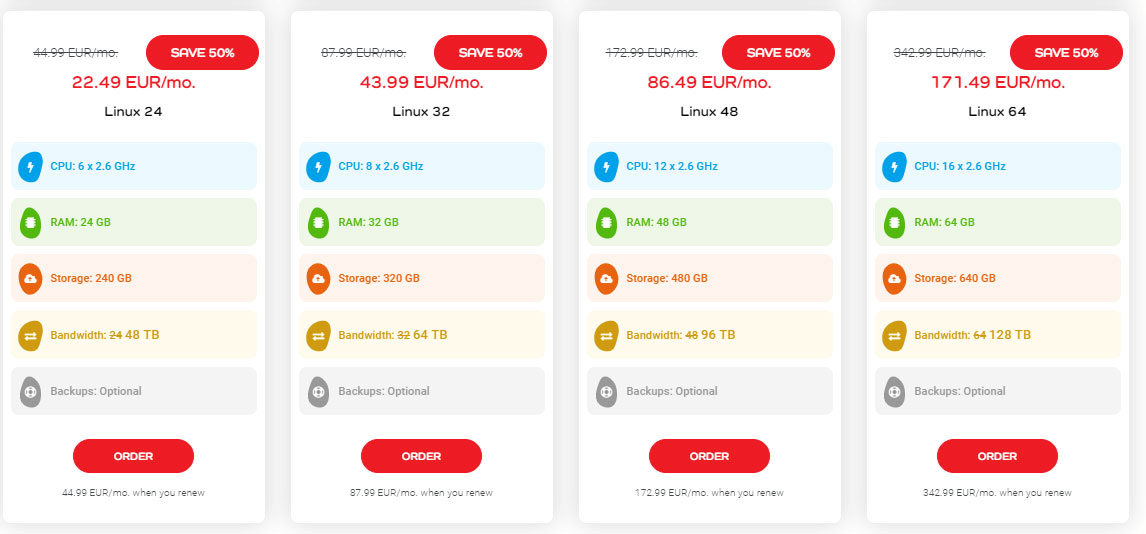
Specs of Time4VPS
- CPU: 16 cores
- RAM: 64 GB
- Storage: 640 GB RAID 10 SSD
- Server location: Lithuania
7. VPSDime

VPSDime offers affordable Linux VPS hosting powered by Intel Xeon Gold processors. One of its main strengths is the generous RAM allocation: plans range from 4 GB all the way up to 288 GB ECC RAM, while every plan uses enterprise-grade SSD storage and a 10 Gbps uplink.
However, there is an important limitation if you are specifically looking for a 16-core VPS. VPSDime's standard Linux VPS plans currently provide a maximum of 4 CPU, even on the largest configurations. The service is therefore more suitable if you need a large amount of RAM at a relatively low price rather than a high vCPU count.
If you specifically need 16 CPU cores, VPSDime also has its Premium VPS range. Its largest Premium plan includes 16 fully dedicated CPU cores, 64 GB ECC RAM, 960 GB SSD storage, 32 TB of monthly transfer, and a 10 Gbps uplink. Unlike the regular Linux VPS, the CPU, RAM, and storage resources on Premium VPS are dedicated to your virtual server.
VPSDime provides locations in the US and Europe, including Los Angeles, Dallas, Seattle, New Jersey, London, and Amsterdam.
Starting price: $360 per month for 16 CPU
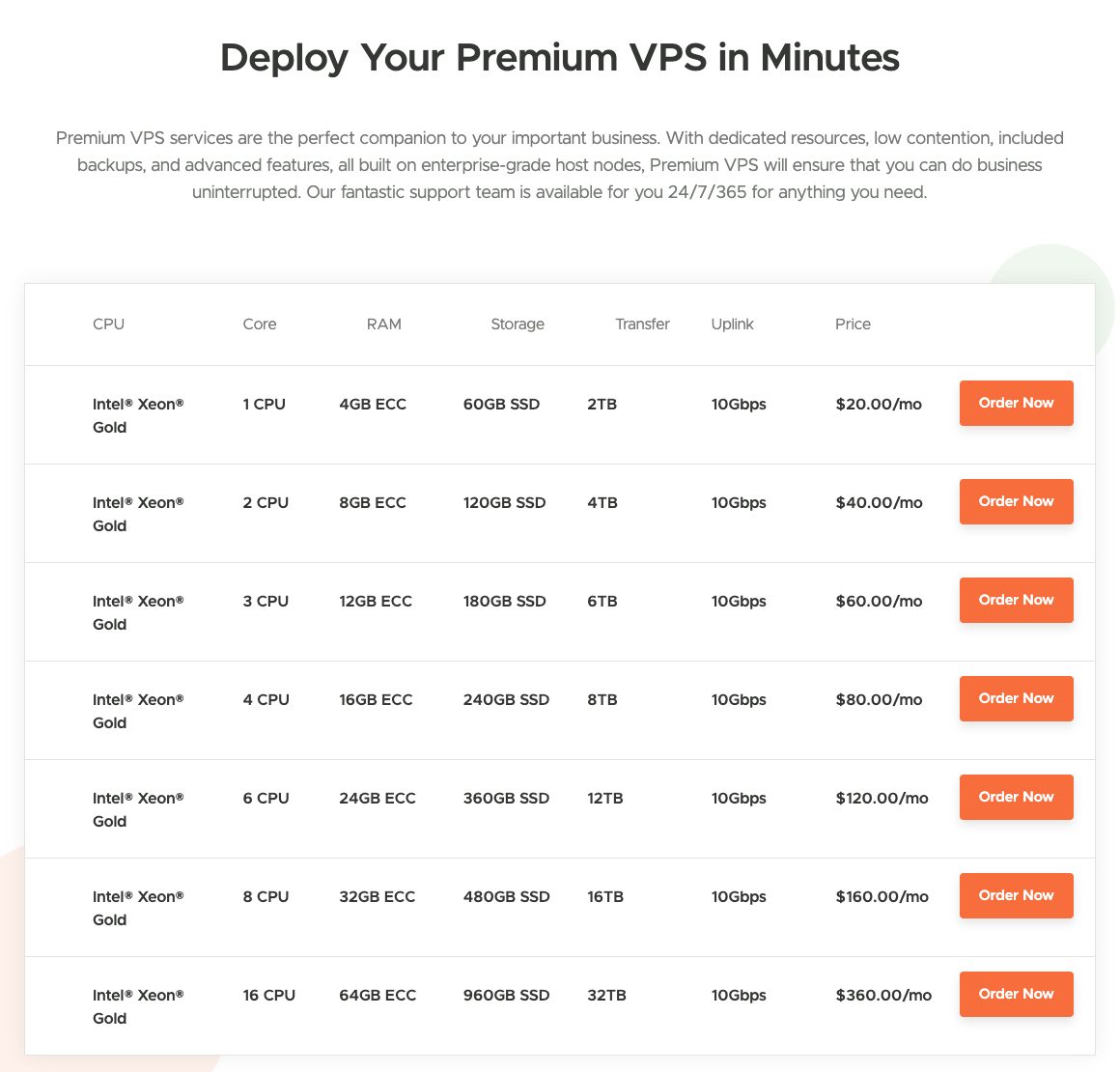
Specs of VPSDime Premium VPS
- CPU: 16 dedicated CPU cores
- RAM: 64 GB ECC
- Storage: 960 GB enterprise SSD
- Bandwidth: 32 TB transfer
- Network: 10 Gbps uplink
- Virtualization: KVM
- Server locations: USA, UK, and Netherlands
Buying guide for 16 core VPS
Resources
See if it has 16 virtual cores or 16 cores. Further, you can also see the amount of RAM and storage along with the storage type.
Pricing
Starting price will tell you about the initial cost. Some VPS have higher renewal rates. So, take that into consideration as well.
Performance and Uptime
Anything above 99% of uptime is great.
Conclusion
All the given cheap 16-core VPS providers are reliable and give optimal performance. You can go with any of them as per your need.
Here’s a quick roundup if you want the cheapest high-core server.
- Cheapest 16 vCPU VPS: Impreza Host
- Cheapest with dedicated CPU resources: Cherry Servers
FAQ
Is vCPU the same as core?
vCPU is the virtual CPU running in a physical core. If you got a server with 8 core x8, the total vCPU will be 64.
How many CPUs can a server have?
Usually, a server can hold in the form of 1,2,4,8,16,32 cores. However, vCPU can differ.
How many cores are good for a server?
If you want to run a heavy load, 8 to 32 cores are suitable. Usually, people go with 16 cores.
How much RAM do I need for VPS?
For a 16-core VPU, 24 GB RAM is more than enough to run. You can go with the server with upgradable RAM.